




Clinic Guide
Software Checklist for Clinics: What to Check Before Choosing
Choosing software for clinics shouldn't start with an endless list of modules. Almost any provider can say they have scheduling, patients, documents, reports, or artificial intelligence. The useful question is different: does the system improve the clinic's actual workflow, or does it just add another screen to the daily grind?
This checklist is designed for medical directors, administrators, and teams who are comparing medical software before purchasing, migrating, or standardizing their operations. Use it before a demo to review scheduling, patient management, clinical documentation, security, roles, adoption, and continuity among professionals.
The goal is not to choose the platform with the most features. The goal is to choose a tool that helps make every encounter have clear clinical context, auditable documentation, and useful follow-up, without undermining professional responsibility or data security.
Before comparing providers, map your clinic's actual workflow.
Many evaluations fail because they start with overly general questions: does the software have a scheduler, can it register patients, does it save documents, or does it use AI. Those answers rarely show how the team will work on a normal day.
Before opening a comparative chart, describe the complete workflow. How does an appointment enter the system? Where is the reason for consultation recorded? Who reviews the patient's history before the consultation? What documents come with the patient? How is the clinical note generated? Who reviews it? What does reception, administration, or management need without exposing irrelevant clinical information?
Good software for clinics should respect that process and reduce friction. If it only handles scheduling but leaves clinical documentation out of the workflow, the team may continue to waste time reconstructing context after each patient visit.
Master Checklist for Evaluating Clinic Software
Use these points as a guide during the evaluation. Mark each area as Complete, Pending, or Not Applicable, and ask for concrete examples when an answer sounds too broad.
1. Agenda connected to the clinical context
The medical appointment schedule shouldn't just be a calendar. In a clinic, each appointment should be linked to the correct patient, the reason for consultation, and the context the professional will need when attending to them.
- Is the appointment connected to the patient's file or context?
- Is the reason for the visit visible before the appointment?
- Can reception support the operation without seeing sensitive clinical information they don't need?
- Does the diary help prepare for the consultation, or does it only organize schedules?
Warning: the provider shows a nice agenda, but cannot teach how that appointment connects to the clinical note, documents, and follow-up.
2. Patient management with non-dispersed information
Patient management should facilitate continuity. The team needs to find histories, documents, previous consultations, instructions, and pending tasks without relying on scattered messages, local files, or individual memory.
- Is the relevant history organized around the patient?
- Can prior documents be reviewed before the consultation?
- Is tracking associated with care and not with an informal conversation?
- Does the system maintain context when the professional, location, or shift changes?
To further this point, please review the page patient management for clinics.
3. Clinical documentation while the professional is attending
This point often separates administrative software from truly useful clinical software. The clinic doesn't just need to store information; it needs to convert the encounter, available documents, and context into structured, reviewable clinical documentation.
- Can the platform prepare drafts from a query?
- Can you work with ambient audio, video calls, clinical documents, or quick notes?
- Does the professional retain final review, editing, approval, and signature?
- Is documentation integrated into the team's workflow instead of being an afterthought?
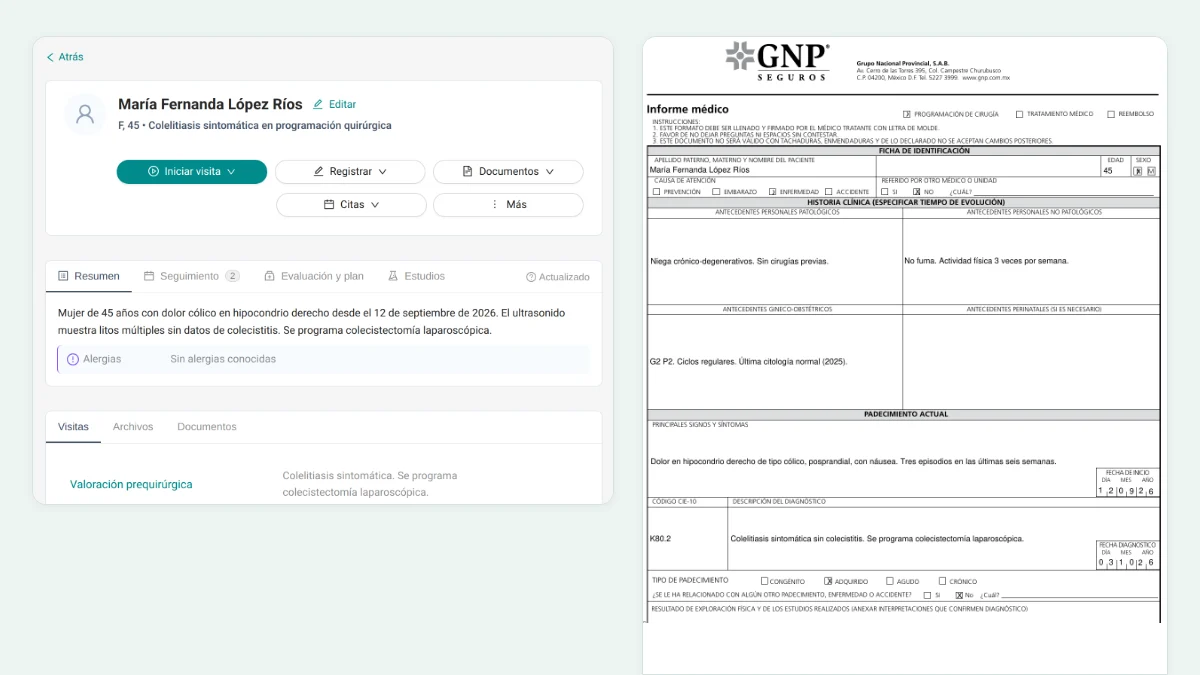
Itaca is designed around this idea: to help create clinical notes with AI as revisable drafts, not as definitive notes without professional judgment.
4. Clinical Templates and Note Rules
Templates are useful when they reflect actual practice. A clinic might need distinct structures for initial consultation, SOAP, pediatrics, gynecology and obstetrics, emergency care, nutrition, psychotherapy, vital signs, or surgical follow-up.
It's also advisable to check if the system allows for rules to maintain consistency: what information should remain visible, what should be marked as pending, how to separate background information from assessments, and how to prevent a draft from turning an incomplete observation into a closed conclusion.
- Are there useful clinical templates for the clinic's types of care?
- Can the clinic reuse its own format if it already works with one?
- Do rules help standardize without making the query rigid?
- Does the system avoid publishing any internal templates, prompts, or proprietary logic?
Can you review more by clinical note templates and Clinical note rules.
5. Review, signature, corrections, and addenda
The software must distinguish between an assisted draft and a final clinical note. AI can accelerate preparation, but the ultimate responsibility lies with the professional who reviews, corrects, approves, and signs.
- Is the note clearly left as a draft before it's approved?
- Can the professional edit, delete, or complete information before signing?
- Are subsequent corrections recorded as addenda or clarifications?
- Does the workflow leave a trace of review, approval, and signature?
This topic deserves its own attention. See Signature, review, and approval of clinical notes to understand how clinical responsibility should be maintained.
6. Data Security, Privacy, and Ownership
Security should not appear at the end of the demo as a technical note. If the software processes clinical data, the clinic should understand how the information is encrypted, who has access, what controls are in place, and what happens to the data used to generate drafts.
Itaca complies with applicable HIPAA requirements for its operations, works with cloud providers under BAA agreements, encrypts information in transit and at rest, does not use clinical data to train models, and does not sell or provide clinical data to third parties for commercial purposes unrelated to the service. The information belongs to the user and their organization.
- Is the data encrypted in transit and at rest?
- Are there adequate agreements with cloud providers when applicable?
- Does the provider confirm that they do not use clinical data to train models?
- Can administrators review team usage, access, and activity?
- Do roles separate doctors, reception, administration, and support?
For this point, reference link: Security and privacy in clinical notes with AI.
7. Team Adoption
Software can be powerful and still fail if the team doesn't adopt it. Evaluate whether it reduces actual work for doctors, reception, and administration, or if it forces duplicate entry of information between tools.
- Does the professional document with less administrative work?
- Do the front desk and administrative staff have clearly defined responsibilities that do not encroach on clinical duties?
- Can leadership see adoption, usage, and outstanding issues without reviewing every clinical note?
- Does the workflow work for multiple professionals, locations, or shifts?
8. Importing and Migrating Patients
If the clinic already has data in another system, spreadsheets, or files, ask how it is imported, what is validated, and what limitations exist. A responsible migration does not promise automatic perfection; it defines what information can enter the system and what the team must review before using it clinically.
- Does the import preserve the relationship between patient, documents, and context?
- Is there validation before clinical use?
- Is it clear which data cannot be imported or will require cleaning?
- Does the vendor avoid promising universal migrations without review?
Useful questions to ask during a demo
During the demo, ask to see a full case. Navigating menus is not enough. The demo should show how a clinic works from appointment to revised note.
- Show me how an appointment is created and how the context reaches the professional.
- What does reception see and what does the doctor see?
- How is a clinical note draft generated during or after care?
- How are templates and documentation rules applied?
- What happens before signing or saving the final note?
- What visibility does an administrator have into usage, access, and activity?
- What happens to the audio, documents, and drafts that are generated?
- How are patient referrals from other sources handled?
Red flags when choosing medical software
Some promises sound attractive, but they can hide operational, clinical or security risks. Stop the evaluation if the provider cannot answer clearly.
- It promises that AI will completely eliminate the need for human review.
- Treat data security, privacy, or ownership as secondary details.
- It doesn't explain what happens with audio, documents, or processed data.
- Present patient imports as automatic and seamless.
- It claims to replace all of the clinic's systems without explaining its scope and limitations.
- He confuses a medical schedule with the entire clinical process.
- It cannot show an example of care from an appointment to a revised note.
How to Interpret the Checklist Results
If many questions remain unanswered, it doesn't necessarily mean the software is bad. It means you need to clarify its scope before purchasing it. In clinics, the decision affects more than just administration: it affects how care is documented, how context is shared, how sensitive information is protected, and how continuity is maintained when multiple people are involved.
A good sign is that the provider can demonstrate a complete workflow, accurately explain security, respect data ownership, and hold the professional responsible for the final note. For Itaca, that is the core of the product: shared clinical documentation that is built as the team attends to patients.
Where to Learn More
If you are evaluating a solution for your team, start by Clinic software. You can also review how Itaca addresses Medical Scheduling Software for Clinics, patient management, clinical notes with AI, templates, rules, signature and review, y security and privacy.
Frequently Asked Questions
What should a software checklist for clinics include?
It should include scheduling, patient management, clinical documentation, templates, peer review, security, roles, administrative visibility, team adoption, and data import if the clinic is migrating from another source.
Should medical clinic software include a medical appointment scheduler?
Yes, but the appointment alone doesn't solve the clinical workflow. The appointment needs to be connected to the patient, the reason for consultation, documents, the clinical note, and follow-up.
How to evaluate clinical documentation before choosing software?
Request to see how a real query is turned into a revisable draft, how templates or rules are applied, and how the professional edits, approves, and signs the final note.
What questions to ask about clinical data security?
Inquire about encryption, access roles, administrative visibility, cloud provider agreements, audio retention, and whether clinical data is used for model training. The response regarding training must be clear: no.
Can AI automatically save clinical notes as definitive?
It shouldn't. In a responsible clinical workflow, AI prepares a draft; the professional reviews, corrects, approves, and signs the final documentation.
When is it a good idea to schedule a demo?
When the clinic has a clear understanding of its current workflow, volume of consultations, team roles, documentation needs, security criteria, and questions about integration or migration.
Evaluate Itaca with the actual flow of your clinic
If your team wants to reduce administrative burden without losing professional review, check out how Itaca connects schedules, patients, and shared clinical documentation around each appointment.


Leave a Reply