


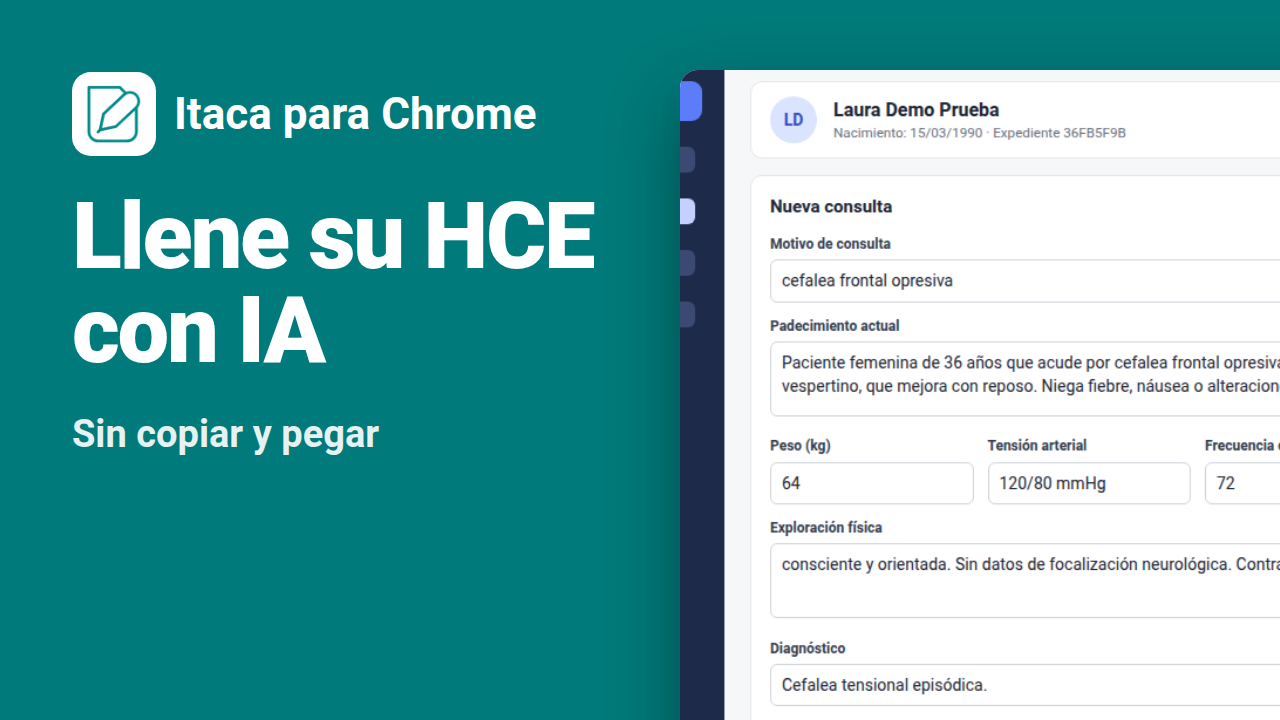
Itaca is now available as a Google Chrome extension. Document the visit in the side panel and bring the clinical note into the web electronic health record (EHR) you already use, without copying and pasting field by field.

The visit ends. The note is ready. And then the other half of the work begins.
Open the patient's chart in your EHR. Copy the chief complaint. Paste it. Go back to the note. Copy the history. Paste it. Find where the physical exam, vital signs, diagnosis and plan go. Check that nothing ended up in the wrong field.
It's a few minutes per patient. By the end of the day, those are the minutes that stretch your wrap-up, or eat into your evening.
With the Itaca extension for Chrome, that step comes down to reviewing and confirming.

Your clinical scribe, next to your EHR
The extension opens Itaca in Chrome's side panel, next to the tab where you work in your EHR. You don't switch systems or windows: you document the visit in Itaca and bring it into your EHR from the same place.
How it works, in three steps
- Document the visit in the panel. Record an in-person visit or a video call, dictate, type or upload audio. Itaca prepares a draft clinical note that you review and adjust.
- Open the patient's chart in your EHR. In the tab next to it, with the visit form open, as you always do.
- Click «Fill EHR» and confirm. Itaca shows you what will go into each field before writing anything. You confirm, review the result and save in your EHR.
The chief complaint goes into the chief complaint field. Vital signs, into their boxes. The diagnosis and the plan, where they belong. If a field can't be filled automatically, Itaca tells you so you can copy it by hand.
Works with the web EHR you already use
No integration, no IT project, no switching systems. If your EHR opens in Chrome, Itaca can read the structure of its form and fill its fields: your clinic's, your private practice's, or the one at each place you see patients.
You decide which sites Itaca works on. The first time you fill a note in an EHR, Chrome asks for permission for that site, and only that site. You can remove it anytime in Chrome's settings.
You review, you save
Filling your EHR doesn't mean losing control over what gets recorded. The extension is built so that nothing reaches the chart without you seeing it:
- Checks the patient. Before filling, Itaca confirms that the chart open in your EHR belongs to the patient in the note.
- Shows each field before writing. You see what text goes into each field and can untick anything you don't want filled.
- Keeps what you already wrote. If a field already has text, Itaca doesn't replace it: you can leave it as is or add to the end.
- Doesn't save for you. Itaca fills the form; you review it and save it in your EHR, as always.
The note also stays in Itaca as a backup. Itaca prepares drafts for review: the healthcare professional must review, edit and approve the documentation before using it in clinical practice. See our Privacy policy to learn how we handle information, including the extension's.
Install Itaca in Chrome
The extension installs for free from the Chrome Web Store and uses the same Itaca account as the web version and the mobile app. Filling the EHR is available on the Pro and Premium plans. In clinics, the administrator decides which professionals can use it. See Itaca plans.
- Open the Itaca page in the Chrome Web Store and click «Add to Chrome».
- Pin Itaca to Chrome's toolbar so it's always one click away.
- Open the panel, sign in with your Itaca account and document your next visit.
Don't have an account yet? Create your Itaca account and try the extension at your next visit.
Finish the visit with the note done, and your EHR up to date.
Frequently Asked Questions
Which electronic health records does it work with?
With electronic health records used in the Chrome browser on a secure site (https). It doesn't need an integration with your EHR vendor. If a field uses a component Itaca can't fill, it tells you so you can copy it by hand.
Does Itaca save the visit in my EHR?
No. Itaca fills the fields of the open form, but it doesn't save, submit or close the visit. You review the result and save it in your EHR.
What if a field already has text?
Itaca doesn't replace what's already written. You can leave that field as is or add the note's text to the end.
How does Itaca know it's the right patient?
Before filling, Itaca compares the patient details shown in the chart open in your EHR with those in the note. If they don't match, it warns you before writing.
Do I need a new account?
No. The extension uses your existing Itaca account. Filling the EHR is available on the Pro and Premium plans.
Does it work in other browsers?
The extension is available for Google Chrome on desktop. From any other device you can keep using Itaca on the web and in the mobile app.
Google Chrome and Chrome Web Store are trademarks of Google LLC.


Leave a Reply